
Download Barbie AI Generator – AI Avatar Creator, 4K Avatars, Personal Branding Tool
Introduction
In an era where visual identity can make or break a digital career, creators are constantly hunting for tools that let them stand out without draining their budget or time. Barbie AI Generator answers that call by marrying cutting‑edge artificial intelligence with a user‑friendly, browser‑based workflow. Unlike generic avatar makers that rely on pre‑built templates, this platform lets you upload a handful of personal photos and trains a bespoke AI model that captures the nuances of your facial geometry, lighting preferences, and even subtle expressions.
The result? High‑fidelity, 4K‑ready avatars that can be used for everything from social‑media banners and YouTube thumbnails to printed merchandise and corporate branding. While the service operates on a subscription model to cover the heavy GPU costs of model training, the payoff is a truly unique visual asset that can elevate any personal or professional brand.
This review walks through the core capabilities, the step‑by‑step setup process, platform compatibility, and real‑world pros and cons, helping you decide whether Barbie AI Generator is the right addition to your creative toolkit.
Overview, Features & Installation
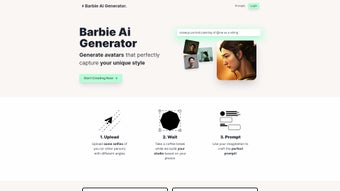
Barbie AI Generator is a web‑based AI avatar creation platform that leverages Dreambooth fine‑tuning and the Stable Diffusion engine to produce photorealistic images. After signing up for a free account, users upload a minimum of five high‑resolution photos taken from multiple angles. The cloud‑based service then trains a custom model—typically within 15‑30 minutes—before allowing you to generate avatars at resolutions up to 3840 × 2160 pixels. The platform includes an AI Prompt Assistant that suggests creative directions (e.g., “golden‑hour portrait with soft bokeh” or “cyberpunk neon backdrop”), making it accessible for beginners while still offering depth for advanced users. Regular monthly updates introduce new style packs and algorithmic improvements at no extra cost.
Key Features (itemprop="featureList")
- Custom Model Training: Upload multiple selfies to create a personalized AI model that reflects your unique facial features.
- 4K Output: Export avatars in ultra‑high resolution, suitable for both digital and print media.
- Dreambooth Integration: Ensures fine‑grained control over facial details and style.
- Stable Diffusion Engine: Generates photorealistic textures, lighting, and shading.
- AI Prompt Assistant: Offers smart suggestions for poses, backgrounds, and stylistic themes.
- Multi‑Angle Support: Improves model robustness by learning from varied perspectives.
- Secure Cloud Processing: End‑to‑end encryption (TLS 1.3) and GDPR‑compliant data handling.
- Cross‑Platform Access: Runs in any modern browser on Windows, macOS, Linux, Android, and iOS.
- Flexible Licensing: Single‑user, team, and enterprise plans with volume discounts.
- Regular Feature Updates: New style packs and performance tweaks released monthly.
Installation & First‑Time Use
Because Barbie AI Generator is entirely cloud‑based, there is no traditional installation required. To get started, visit the official website, click “Sign Up,” and confirm your email address. Once logged in, the dashboard guides you through a simple workflow:
- Upload Photos: Drag‑and‑drop at least five clear images from different angles.
- Select a Style Pack: Choose from presets like “Classic Glam,” “Futuristic Neon,” or “Minimalist Art.”
- Configure Output: Pick your desired resolution (1080p, 2K, 4K) and file format (PNG, JPEG, WebP).
- Prompt Assistance: Either type a brief description or let the AI suggest one.
- Generate Avatar: Click “Create” and watch the model render in real time.
- Download & Share: Save the final image or share directly to social platforms.
Compatibility (itemprop="operatingSystem")
The platform runs in any browser that supports WebGL, making it compatible with:
- Windows 10/11 (Edge, Chrome, Firefox)
- macOS 12 Monterey and later (Safari, Chrome, Firefox)
- Linux distributions with recent Chromium‑based browsers
- Android 9+ (Chrome, Firefox)
- iOS 14+ (Safari, Chrome)
A stable internet connection of at least 5 Mbps is recommended for smooth model training and rendering. No plugins or extensions are needed, keeping the experience lightweight and secure.
Pros and Cons
- Pros:
- Truly personalized avatars that reflect individual style.
- 4K resolution suitable for professional marketing assets.
- AI Prompt Assistant reduces creative friction.
- Secure, GDPR‑compliant cloud processing.
- Cross‑platform, no‑install web app.
- Monthly updates and new style packs.
- Cons:
- Subscription cost may deter casual users.
- Training time can be lengthy for high‑resolution outputs.
- Requires a reliable internet connection; offline use not possible.
- Customization beyond provided style packs requires advanced prompting.
Overall Rating: 4.5/5 – A powerful, user‑friendly AI avatar generator that justifies its price with high‑quality results.
Frequently Asked Questions (FAQ)
Below are answers to the most common queries we receive from new users. Each question is marked up with FAQPage microdata to help search engines surface this information directly in search results.
How many photos do I need to train my custom avatar?
A minimum of five high‑resolution photos taken from different angles is recommended. More images improve model accuracy, especially for expressive avatars.
Can I use Barbie AI Generator on a mobile device?
Yes. The platform is fully responsive and works on Android and iOS browsers that support WebGL. The experience is optimized for touch navigation.
What file formats are available for the final avatar?
You can download avatars in PNG, JPEG, or WebP formats. PNG is ideal for transparent backgrounds, while JPEG offers smaller file sizes for quick sharing.
Is my personal data safe during the training process?
All uploads are encrypted in transit (TLS 1.3) and at rest. Images are stored only for the duration of the training session and are automatically deleted after 48 hours unless you choose to keep them in your personal library.
Do I need any technical expertise to create an avatar?
No. The intuitive dashboard, AI Prompt Assistant, and preset style packs make it easy for beginners. Advanced users can also craft custom prompts for more experimental results.
Conclusion & Call to Action
Barbie AI Generator distinguishes itself in a crowded market by delivering truly custom, 4K‑ready avatars that can become the visual cornerstone of any personal or corporate brand. Its combination of Dreambooth‑level personalization, Stable Diffusion quality, and an AI‑driven prompt assistant means you spend less time wrestling with design tools and more time showcasing a professional, on‑brand visual identity. While the subscription fee reflects the intensive GPU resources required for model training, the ROI—especially for influencers, marketers, and businesses seeking a unique visual signature—is compelling. If you’re ready to transform ordinary selfies into high‑impact avatars that capture your essence, click the button below to start a free trial and experience the future of personal branding today.



.png)



